

Manage subscription
HAQQ makes it easy to subscribe, start a free trial, and invite your team, whether you are inside the AI workspace or the eFirm practice management system. This guide walks you through both paths.
Method 1: Subscribe from the AI interface
When you are inside the HAQQ AI workspace, you will see a Subscription option on the left-hand sidebar. Click it to open the plan selection screen.
Choose your plan
The two product lines are priced separately. Legal AI Chat runs on Free, Starter, Pro and Business. These set your monthly credits and usage ceiling, so heavy research, drafting and review call for a higher tier. eFirm, the practice management side, runs on Boutique and Purple, priced per user. You subscribe to each independently, and a workspace can hold one, the other, or both.
Select billing cycle
Both plans are available on a monthly or yearly basis. Annual billing costs less, so it is worth choosing if you plan to use HAQQ long-term.
Add team seats
Before confirming, set the number of seats you need (it determines how many team members can access HAQQ under your subscription, whether they are joining during the trial or after).
Start your free trial
Once you have selected your plan, billing cycle, and seats, click Start Free Trial at the bottom. Enter your payment details (just like any SaaS subscription), and your trial begins immediately. On eFirm the trial length follows your billing cycle: Boutique is 3 days on monthly and 5 days on annual; Purple is 5 days on monthly and 7 days on annual.
Invite team members
After subscribing, go to Team Members in the sidebar. Click Invite Member, enter their email address, and send the invite. They will receive a link and gain access to HAQQ for the duration of the trial (or subscription).
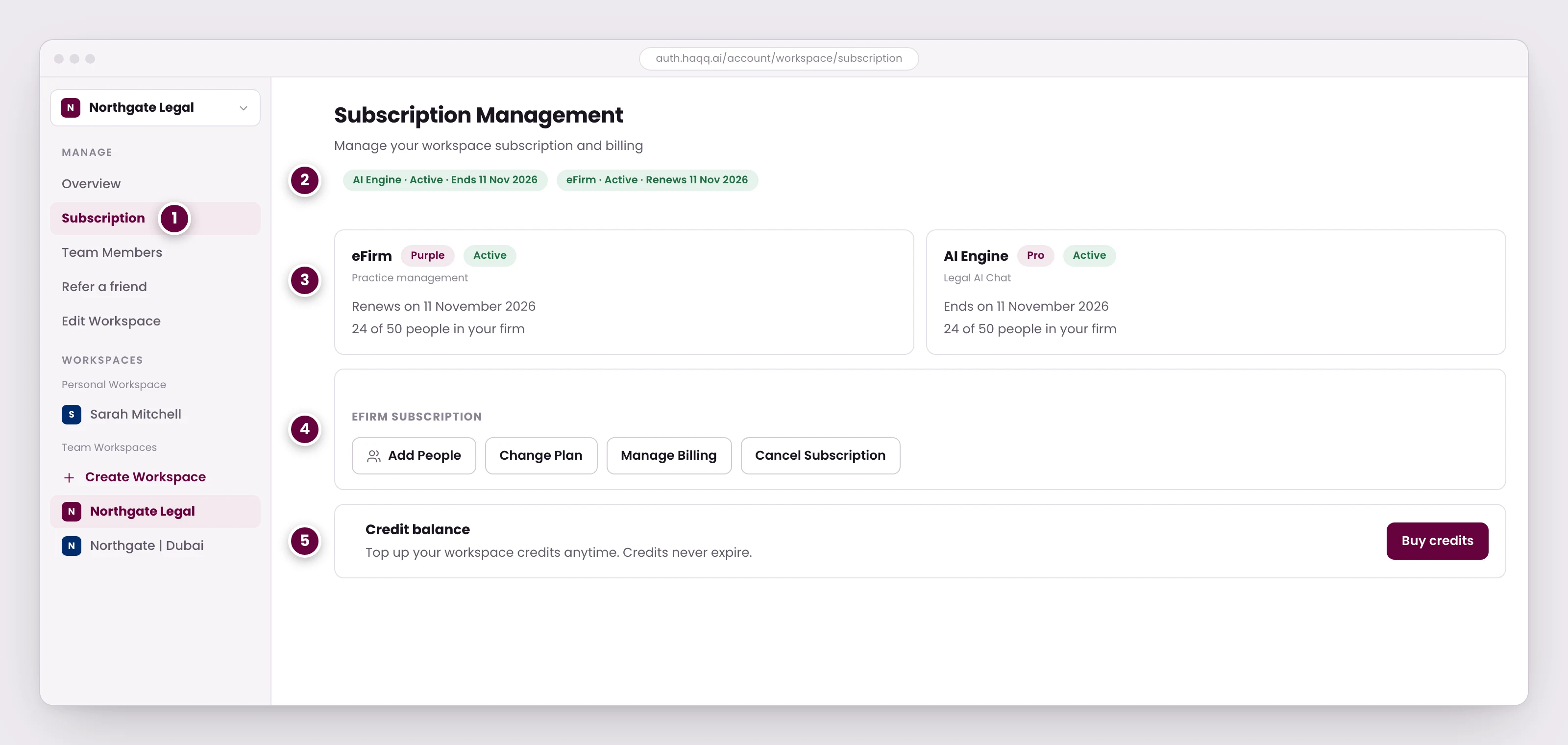
- Subscription sits under Manage, alongside Team Members and workspace settings.
- Each product line carries its own status. One can be renewing while the other is set to end.
- Tier, renewal date and seat usage per product, so you can see what you are paying for before you change it.
- Add seats, move tier, open billing or cancel. Each acts on that one product line, not the whole account.
- Credits are topped up separately from the subscription and do not expire.
Managing a subscription, step by step
Method 2: Subscribe from eFirm
If you are working inside HAQQ eFirm (the Practice Management System), you can also manage your subscription without switching to the AI interface.
- Navigate to the eFirm workspace.
- Click Firm in the navigation menu.
- Select Edit Workspace.
- In the top-right corner, click Manage Subscription.
From here, the experience is identical. You can pick the tier for either product line, select yearly or monthly billing, add seats, and invite your team.
Upgrading, downgrading and seats
You can upgrade at any time from your account settings, and a downgrade takes effect at the end of your billing cycle.
Your team members are billed per seat, and you can add or remove seats at any time.
Payment method, cancelling and reactivating
Both are self-serve, and both belong to workspace admins, so a member who opens the subscription page by its URL is sent back to the workspace overview instead. You can reach them from the workspace subscription page, from Plan & Billing in the chat app's settings, or from the Subscription tab in eFirm settings.
Manage billing hands you to Stripe's hosted customer portal, where the card on file is updated, and returns you to HAQQ when you are done.
Cancel sits on the same card. It asks you to confirm and shows the date your access ends, because cancelling is scheduled for the end of the paid period rather than cutting access immediately. Until that date arrives, Reactivate takes its place and confirms when billing resumes.
Two kinds of subscription cannot be managed this way. One bought through the App Store or Google Play is managed in that store, and one set up for you by HAQQ points you to support instead.
Summary
Subscribing to HAQQ takes less than two minutes. You can do it from the AI interface or from within eFirm, whichever is more convenient. Both paths lead to the same subscription management screen where you choose your plan, set your team size, and start your free trial.
View the full plan comparison on haqq.ai
See also: Subscription plans · Credits and usage