

AI Drafting
HAQQ's Legal AI drafts a full contract from a simple prompt. The agreement is jurisdiction-aware and party-specific, ready in under seven minutes.
It does not just generate generic text. It reads the parties, checks your practice management data, applies jurisdictional knowledge and produces a structured legal document ready for review. Drafting happens in an ordinary chat session, so the draft, the reasoning behind it and every revision stay in one thread.
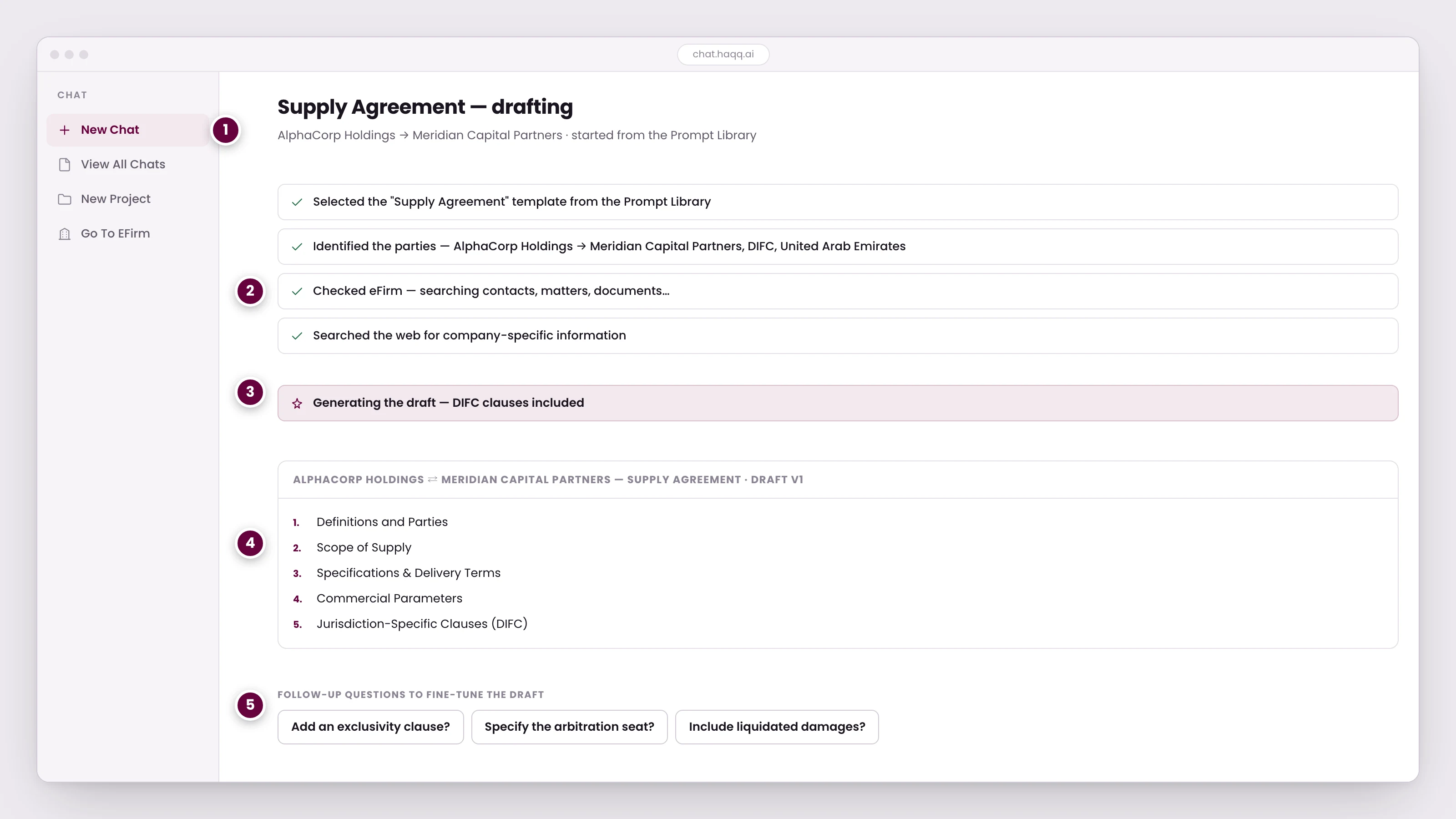
- Drafting happens in an ordinary chat session. The draft, the reasoning behind it, and every revision stay in one thread.
- Before writing a word, the AI checks eFirm for the parties. Anything it cannot find in your contacts, matters, and documents it looks up on the open web.
- The jurisdiction is applied while drafting, not bolted on afterwards. DIFC clauses appear because that is where the parties sit.
- A structured draft rather than prose: numbered sections in the order a lawyer would expect to find them.
- The AI proposes the questions a first draft leaves open. Answering one revises the draft in place instead of starting over.
Watch a contract being drafted
Starting from the Prompt Library
You can begin drafting from the Prompt Library, a curated collection of legal AI prompts. In the worked example below, a supply agreement prompt is selected and customised: Anthropic will supply LLM API access to Shell, under UAE jurisdiction.
How the AI processes your request
Once you submit the prompt, the AI does not start writing. It first:
- Understands the full prompt: what you are asking, what type of agreement, and what terms matter.
- Identifies the parties, Anthropic as the supplier and Shell as the buyer, and understands their roles.
- Checks your eFirm memory. Contacts, matters and prior context stored in your practice management workspace.
- Searches the web for company-specific information, for anything it could not find in your own records, to personalise the agreement.
The jurisdiction is applied while drafting rather than bolted on afterwards. DIFC clauses appear because that is where the parties sit.
Connected to your practice
HAQQ's AI does not live in isolation. It is connected to your eFirm: contacts, legal matters, contracts, hearings, emails and appointments all feed into its context.
When you mention a company or a contact, the AI checks whether they exist in your practice management system. If they do, it pulls the relevant context. If they do not, it searches external sources to gather what it needs, as with Shell and Anthropic in this walkthrough.
The drafted agreement
You get a complete supply agreement, a structured draft rather than prose, with numbered sections in the order a lawyer would expect to find them:
- Definitions and parties
- Scope of supply: API access terms and usage rights
- Specifications and delivery terms
- Commercial parameters, pricing, tiers, minimum commitments, currency
- Jurisdiction-specific clauses under UAE law
The AI also proposes the questions a first draft leaves open, pricing mechanisms, dispute resolution, renewal terms. Answering one revises the draft in place instead of starting over.
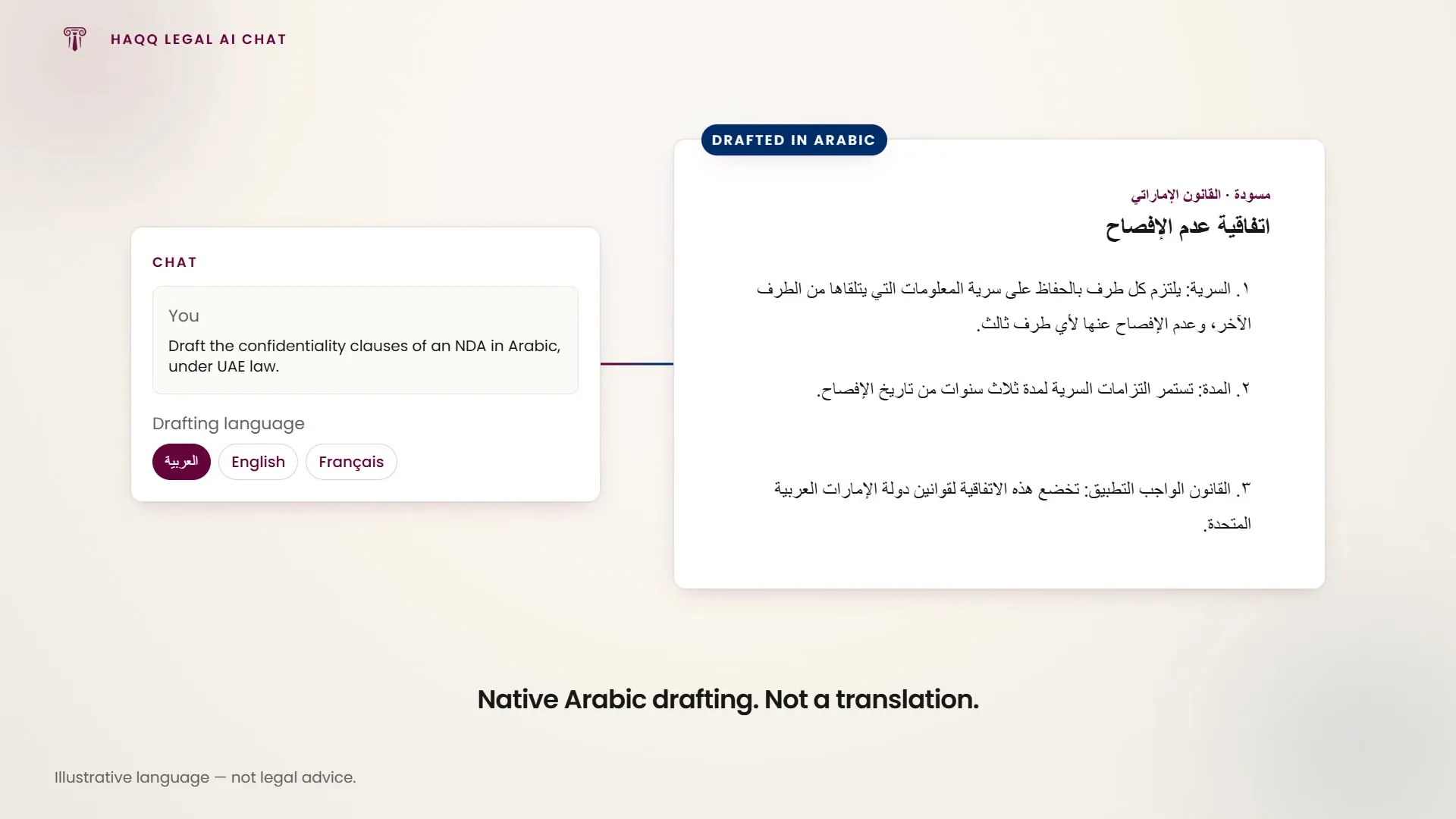
Working with the draft
The draft opens in the Canvas editor, so the document you just generated is the document you edit. There is no copy-paste round trip through Word to get started.
- Edit in place: type directly into the draft to change a clause, tighten a definition, or drop a term the deal does not need. The conversation stays open beside it, so you can also ask for the change in the prompt instead of making it by hand.
- Track changes. Turn it on and every edit is marked, so you can accept or reject each one individually, and so the other side can see exactly what moved.
- Export as Word or PDF. Word keeps the document editable, which is what you want if it is going to a colleague, a client, or the other side to negotiate. PDF is for the version that is final.
Follow-up and related documents
From the same conversation, you can ask for related documents:
- A commercial agreement to complement the supply terms
- An NDA for the initial call between the parties
- A service agreement as an alternative structure
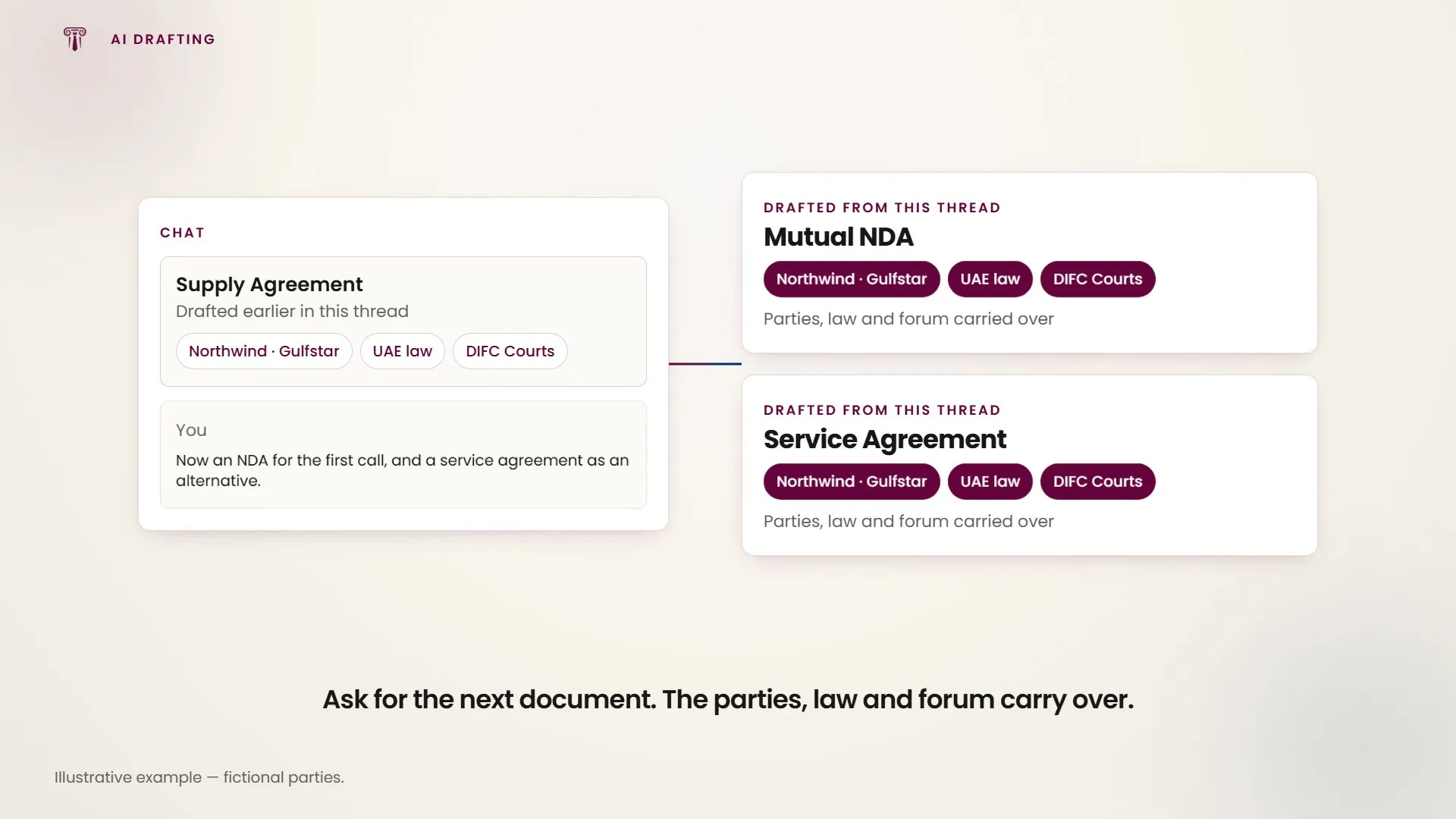
Each document inherits the context from the conversation. Parties, jurisdiction and terms carry forward automatically.
Powered by the Justinian AI engine
HAQQ's Legal AI runs on the Justinian AI engine, purpose-built for legal work. Unlike generic LLMs, it understands:
- Specific jurisdictions and their legal frameworks
- Party roles and relationships
- Legal document structure and conventions
- Trusted legal libraries and databases
The result is a personalised, jurisdiction-aware document that follows how a lawyer would actually draft, not a generic template.
AI levels
HAQQ offers different AI levels, from Paralegal to Legal AI Twin. The Legal AI Twin is the most advanced, with access to:
| Source | What it covers |
|---|---|
| eFirm data | Contacts, matters and context from your workspace |
| Web search | Company information and public records |
| Trusted legal libraries | Laws, statutes and jurisdictional databases |
| Advanced reasoning | Structured legal analysis and follow-up |
Which levels your plan includes, and how to set your default, are covered in Subscription plans and AI Settings.
Why it matters
Compared to generic AI tools, HAQQ's Legal AI produces significantly better results for legal work, because it is an industry-specific engine with the right jurisdictional knowledge and legal conventions built in.
A three-line prompt produces a draft that covers most of the work. A detailed prompt from a practising lawyer produces something closer to final.
Where to go next
Prompt Library · Legal AI overview · AI Settings · eFirm practice management