

Prompt Library
The Prompt Library is a curated, structured collection of legal AI prompts. You can browse, copy and use them directly across the platform without signing in.
Every prompt is purpose-built for legal work: drafting contracts, reviewing agreements, researching case law, summarising statutes and more. They are categorised by use case, practice area and deliverable type so you can find what you need instantly, rather than starting from a blank composer.
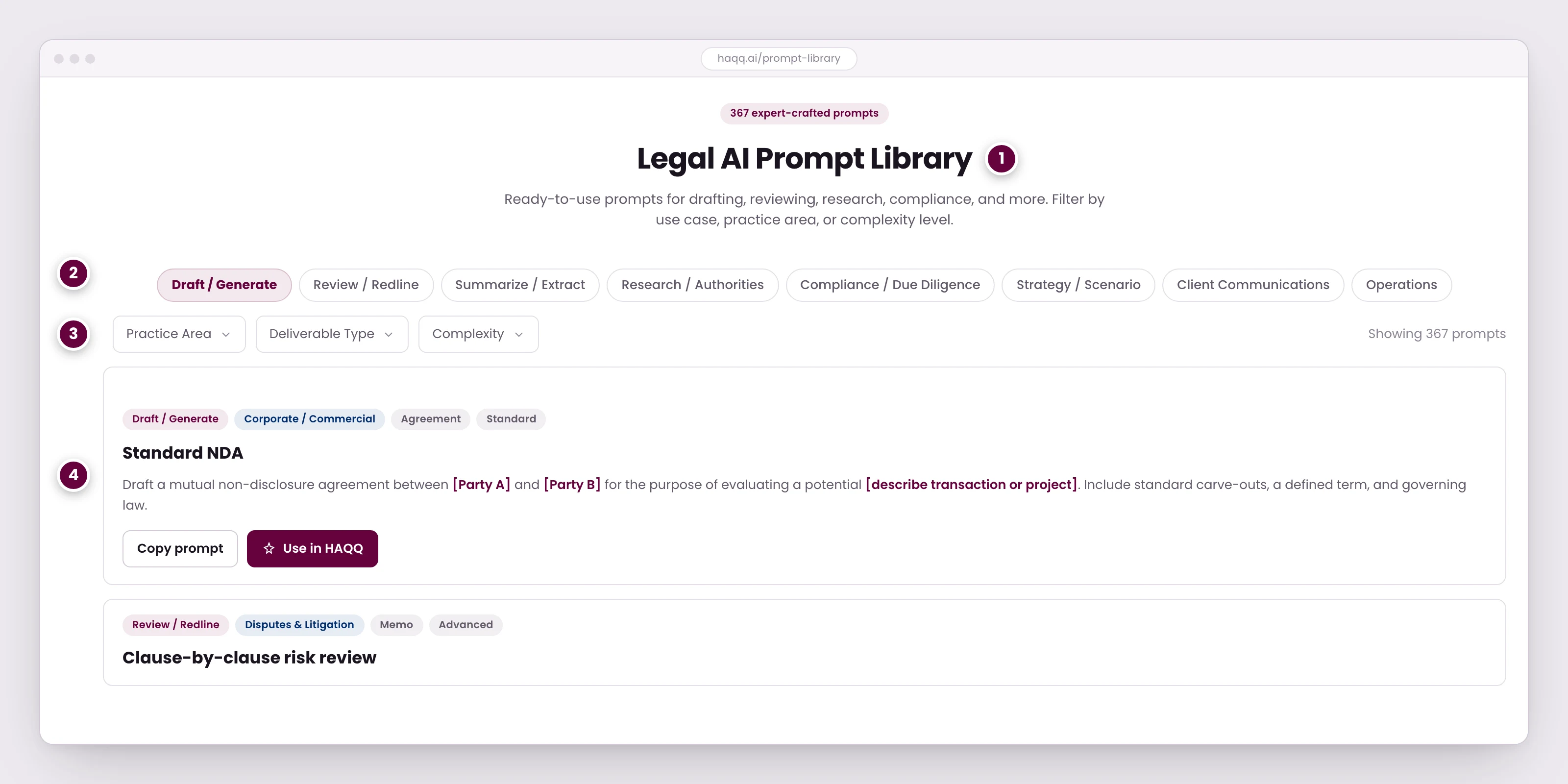
- The library is public. You can browse and copy every prompt without signing in.
- The same eight task categories you see when starting a chat, so a prompt you find here maps onto where you would use it.
- Narrow by practice area, the deliverable you need, or how involved the prompt is.
- Bracketed placeholders are yours to replace. Everything else is drafted to work as written.
What is in the library
Today the library holds 394 prompts across 23 practice areas, in four languages: English, Arabic, Spanish and French. It grows, so treat the counts below as a snapshot of shape rather than a fixed inventory; the live page always shows the current set.
The eight use cases
Use case is the primary filter, and it is the same eight-category split you see when you start a chat in Legal AI. A prompt you find here therefore maps onto where you would use it.
| Use case | What it covers | Prompts |
|---|---|---|
| Draft / Generate | Create contracts, agreements, memos | 237 |
| Strategy / Scenario | Plan approaches and outcomes | 61 |
| Compliance / Due Diligence | Check requirements and risks | 25 |
| Review / Redline | Analyse and mark up documents | 22 |
| Research / Authorities | Find cases, statutes, regulations | 19 |
| Operations | Billing, intake, workflows | 11 |
| Summarize / Extract | Condense and extract key information | 10 |
| Client Communications | Draft client-facing content | 9 |
The distribution is deliberate rather than accidental: drafting and strategy are where a blank page costs a lawyer the most time, so that is where the library is deepest.
Practice areas
The 23 practice areas split into firm-side work and the areas a lawyer meets when acting for an individual:
- Firm and commercial: Corporate / Commercial, Corporate / M&A, Corporate Governance, FinTech / Payments, IP / Licensing, Employment, Privacy & Data Protection, Disputes / Litigation, Arbitration, Legal Ops / Billing, Small Business.
- Individual and citizen covers Family Law, Housing & Tenancy, Consumer Rights, Estate Planning, Immigration, Personal Injury, Employee Rights, Real Estate (Personal), Personal Tax, Criminal Defense, Debt & Bankruptcy, and Citizen / Admin.
Deliverable type and complexity
Two further filters narrow a list quickly once you know the shape of the answer you want. Deliverable type is what comes back (Agreement, Policy, Memo, Checklist, Playbook or Report). Complexity is how much the prompt asks for, on a five-step scale:
| Level | Label |
|---|---|
| 1 | Starter |
| 2 | Standard |
| 3 | Advanced |
| 4 | Expert |
| 5 | Enterprise |
Most of the library sits in the middle (Standard and Advanced together account for the majority of prompts), with a smaller number of Starter prompts for a first session and a handful of Enterprise-level ones that expect a fully briefed matter behind them.
Using a prompt
- Filter to the work. Pick the use case first, then narrow by practice area, deliverable or complexity.
- Read the placeholders. Bracketed placeholders, such as [Party A] and [describe the transaction], are yours to replace. Everything else is drafted to work as written.
- Copy it into the composer and fill the brackets in with the real jurisdiction, parties and posture. A prompt with the brackets left in gets a generic answer, which is the single most common way a good prompt produces a poor result.
- Iterate in the same thread. The prompt is a starting point, not a form. Follow-up questions refine the output in place. See AI Drafting.
What your plan changes
Reading the library is free and needs no account. What changes with your plan is what you can do with a prompt afterwards:
| Plan | What you get |
|---|---|
| Free | View HAQQ's default prompts |
| Starter | Save personal prompts |
| Pro | Share prompts with teammates |
| Business | A firm-wide curated library |
| Enterprise | Firm-wide library plus custom prompt engineering from HAQQ |
The full comparison is on Subscription plans.
Where prompts turn up while you work
You do not have to come here to use a prompt. Three surfaces put ready-made ones in front of you, and all three behave the same way: they fill the composer so you can edit before sending, rather than sending for you.
- The empty state of a new chat. Preset prompts grouped by use case; each category opens a list of ready-made prompts. They are shown only while the conversation is still empty. Once it has messages, follow-up suggestions take their place.
- Workflow cards on the phone. A new chat in the mobile app offers three cards (draft a contract, review a contract, research laws), and each opens a sheet of prompts from this library, with a title and the first few lines of the body so you can judge a prompt before picking it. See HAQQ Mobile.
- Follow-up suggestions. After a reply finishes, up to three suggested follow-ups appear above the composer, matched to what you just asked.
Prompts are read and used, not saved. The product has no prompt-management screen today: no save, favourite, share or curate action exists on any of those surfaces, and no prompt section appears in settings. The plan entitlements in the table above are described on Subscription plans; what exists in the applications right now is the read-and-use path.
Browsing the public library
The library is public. You can browse and copy every prompt without an account, which makes it a reasonable thing to send to a colleague who has not signed up yet: the HAQQ Prompt Library.