

Legal Market
Two things sit on this screen: the Microsoft 365 integrations that connect eFirm to the tools a firm already runs, and the Legal Marketplace, which is not available yet.
Microsoft 365, at two levels
HAQQ integrates with Microsoft 365 at two levels, and the distinction decides who has to do what. Workspace-level integration is an administrator job: it connects Outlook Calendar two-way sync, SharePoint document linking and Microsoft Teams notifications across the entire firm, and is configured once. User-level integration is per person: each team member connects their own Microsoft account from User Settings → Microsoft Integration for personal calendar sync and document access. Connecting the workspace does not connect anybody's mailbox or personal calendar for them.
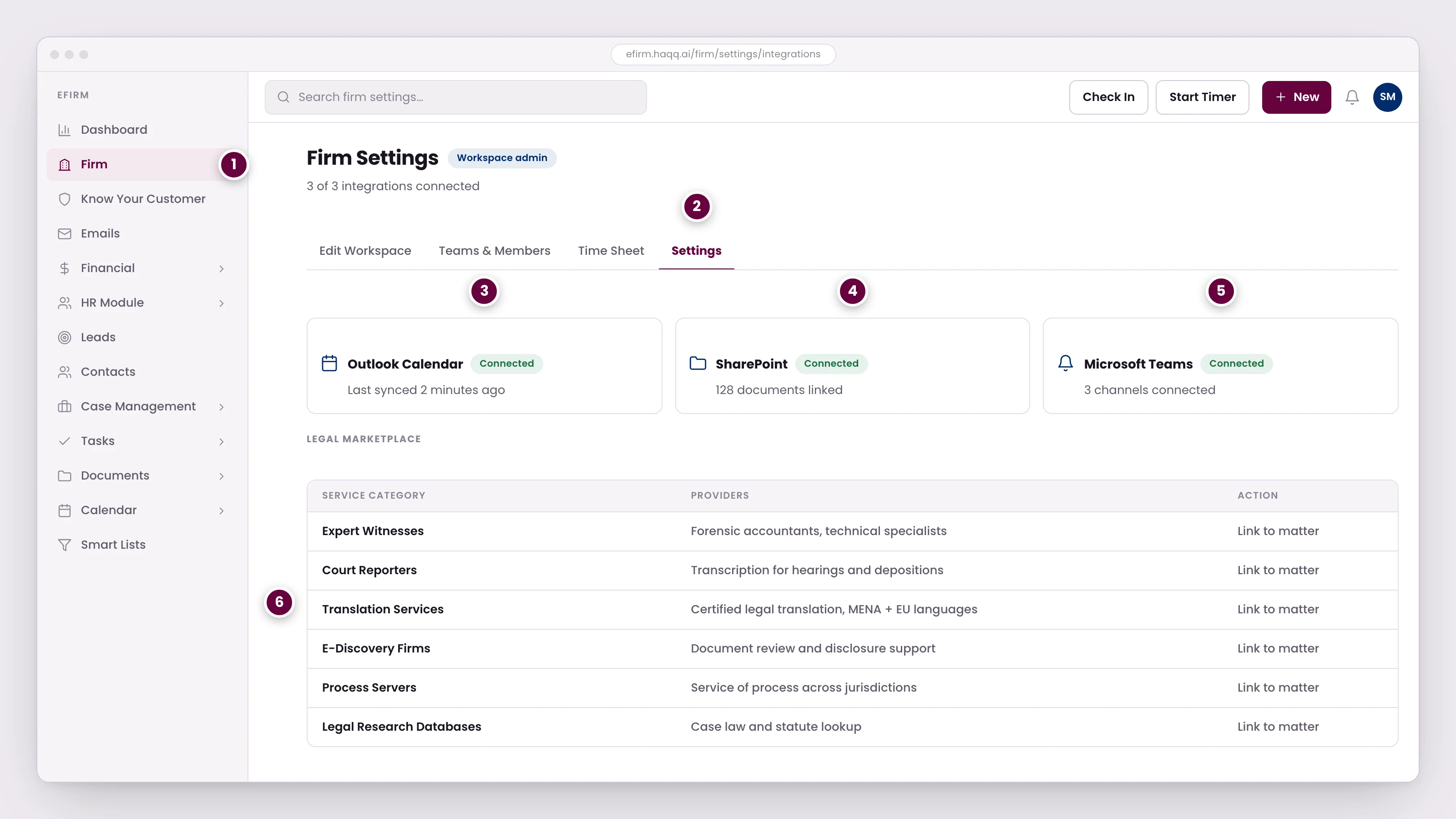
- Integrations are configured once at firm level. Individual members separately connect their own Microsoft account for personal calendar and document access.
- Workspace-wide settings, so connecting here covers the whole firm rather than one user.
- Calendar sync runs both ways. An event created in HAQQ appears in Outlook, and a change made in either place follows to the other.
- Documents stay in SharePoint and are linked into matters and contacts, so firms with an existing document workflow keep it and still get HAQQ search.
- Matter updates, task assignments, and hearing reminders arrive in the Teams channels the firm already watches.
- A directory of outside services: expert witnesses, court reporters, translators, e-discovery, process servers. Linking one to a matter keeps a record of who was engaged on what.
What each integration does
| Integration | What it does | Where it shows up |
|---|---|---|
| Outlook Calendar | Bidirectional sync. An event created in HAQQ appears in Outlook, and a change made in either place follows to the other. | The eFirm Calendar, and each member's own Outlook |
| SharePoint | Links documents from the firm's SharePoint to matters and contacts. Files stay in SharePoint and are still reachable and searchable from inside HAQQ. | The SharePoint tab on every matter and every contact |
| Microsoft Teams | Sends HAQQ notifications (matter updates, task assignments, hearing reminders) into the Teams channels the firm already watches. | Teams, not eFirm |
When to connect
Connect Microsoft 365 late, not first. The recommended firm setup order puts it after global configurations, form templates, roles and permissions, workspace settings and financial settings are in place, because calendar sync and Teams notifications are only useful once matters, hearings and tasks exist to notify anyone about. The full order is on Settings and Customizations.
The Legal Marketplace
Legal Market is a planned section. It is reachable from the eFirm sidebar, but opening it shows a Coming Soon placeholder rather than a working directory. There is nothing to browse yet, and no provider can be attached to a matter or billed against one from here.
Two neighbouring sections in the same area stand on the same footing. All three are navigable so the sidebar stays complete, and each shows the same Coming Soon state:
- Legal Market: a planned directory of outside legal service providers
- Legal Library is a planned firm document and legal-reference library
- Recycle Bin, a planned place to recover deleted items
Where to go next
See the calendar side of the Outlook connection in Calendar, the document side in Documents, and the mailbox side in Emails.