

Workspace
A workspace is your firm's private environment inside HAQQ, one team, one dataset, one operational structure.
What a workspace holds
The workspace is the top-level container for the firm. It holds your team members, matters, contacts, documents, financial records, timesheets, AI context and settings, and every person using your firm's HAQQ instance is a member of it. Think of it as the firm's digital headquarters: everything inside is connected, and everyone inside works against the same data.
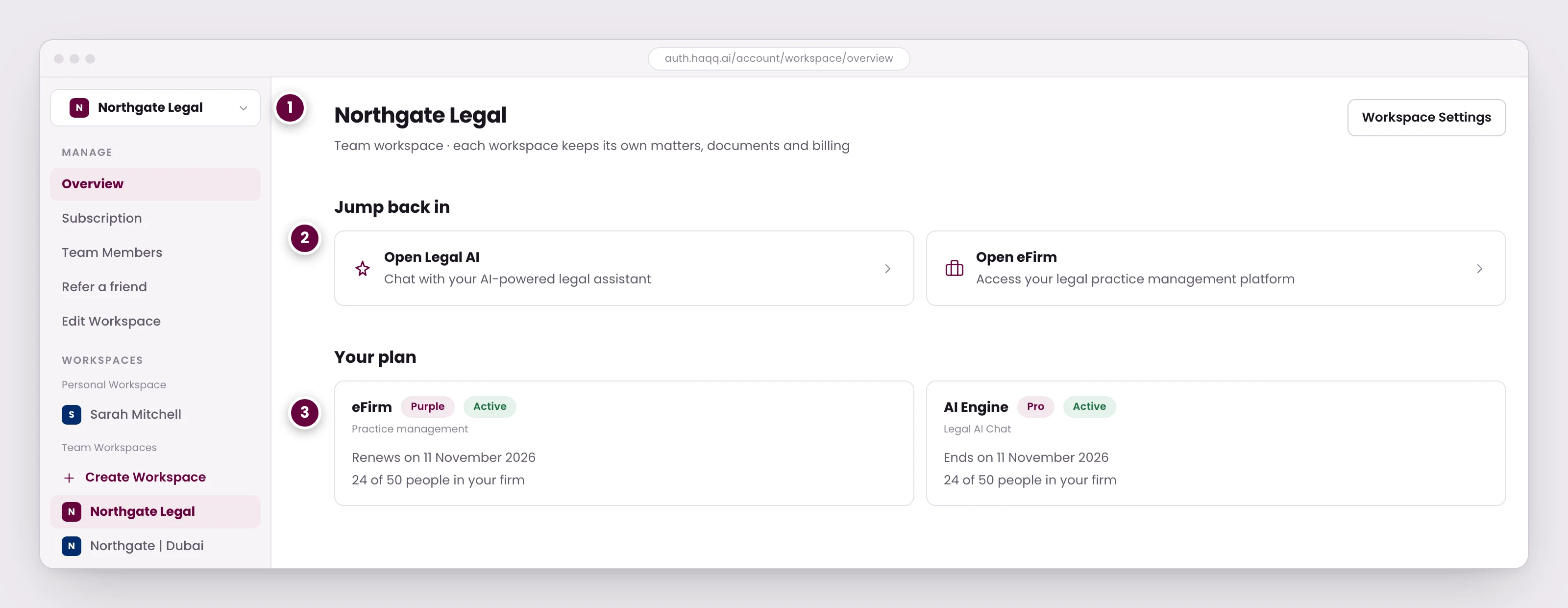
- Switch workspaces here. Each keeps its own matters, documents, billing and team, so a second office or practice stays fully separate.
- Both products open from the same account. One sign-in reaches Legal AI Chat and eFirm.
- The plan belongs to the workspace, not to you. Move to another workspace and the entitlements change with it.
Workspaces and multi-firm data, walked through
Personal and team workspaces
Alongside the workspaces your firm creates, an account has a personal workspace of its own. Both appear in the same list and both open the same two products, but a personal workspace is yours rather than the firm's. Switching back to it is confirmed explicitly, because the data you see changes completely when you do.
The plan belongs to the workspace, not to you
Entitlements travel with the workspace. Move to another workspace and the tier, the seat count and the credit balance change with it, which is why the same person can be on a paid plan in one workspace and a free one in another.
| Element | What it controls |
|---|---|
| Seats | The maximum number of team members who can be active in the workspace, shown as a used-of-available count. |
| Plan tier | The feature set available. The plan badge appears next to the workspace name, and each product line shows its own tier. |
| Credits | The workspace-level AI usage allowance. Pooled across the team rather than allocated per person. |
| Billing cycle | Monthly or annual. The renewal and start dates are visible in the subscription management panel. |
Subscription plans covers what each tier includes, and credits and usage covers how the pool is metered and topped up.
Switching workspaces
A single HAQQ account can belong to several workspaces, and you move between them without reconfiguring anything: no sign-out, no re-setup. In eFirm the switcher sits at the top left under Change Workspace. Elsewhere it is the workspace dropdown, in the same account area that lists every workspace you belong to.
Switching changes the data, not just the view. Each workspace is a separate data environment. The dashboard, matters and documents you see in one do not appear in another, by design. If a counter or a matter list looks empty, check which workspace you are in before anything else. See data architecture.
When a firm needs more than one
Belonging to several workspaces is common in three situations:
- Firms with offices in different countries.
- Consultants who serve several clients and must keep the books apart.
- Organisations maintaining separate demo and production environments.
Whether a multi-office firm should run one workspace or several is a real decision with a real trade-off. The multi-entity page sets out both supported setups and how to choose between them.