

Overview
The HAQQ Legal AI Twin is the AI layer of the HAQQ platform, a jurisdiction-aware legal reasoning engine that drafts, reviews, researches and advises based on your firm's data, your jurisdiction and your matter context.
It is a purpose-built legal AI engine, not a chatbot or a generic language model. It works the way lawyers actually do, inside the matter, connected to your practice management system, and governed by professional accountability.
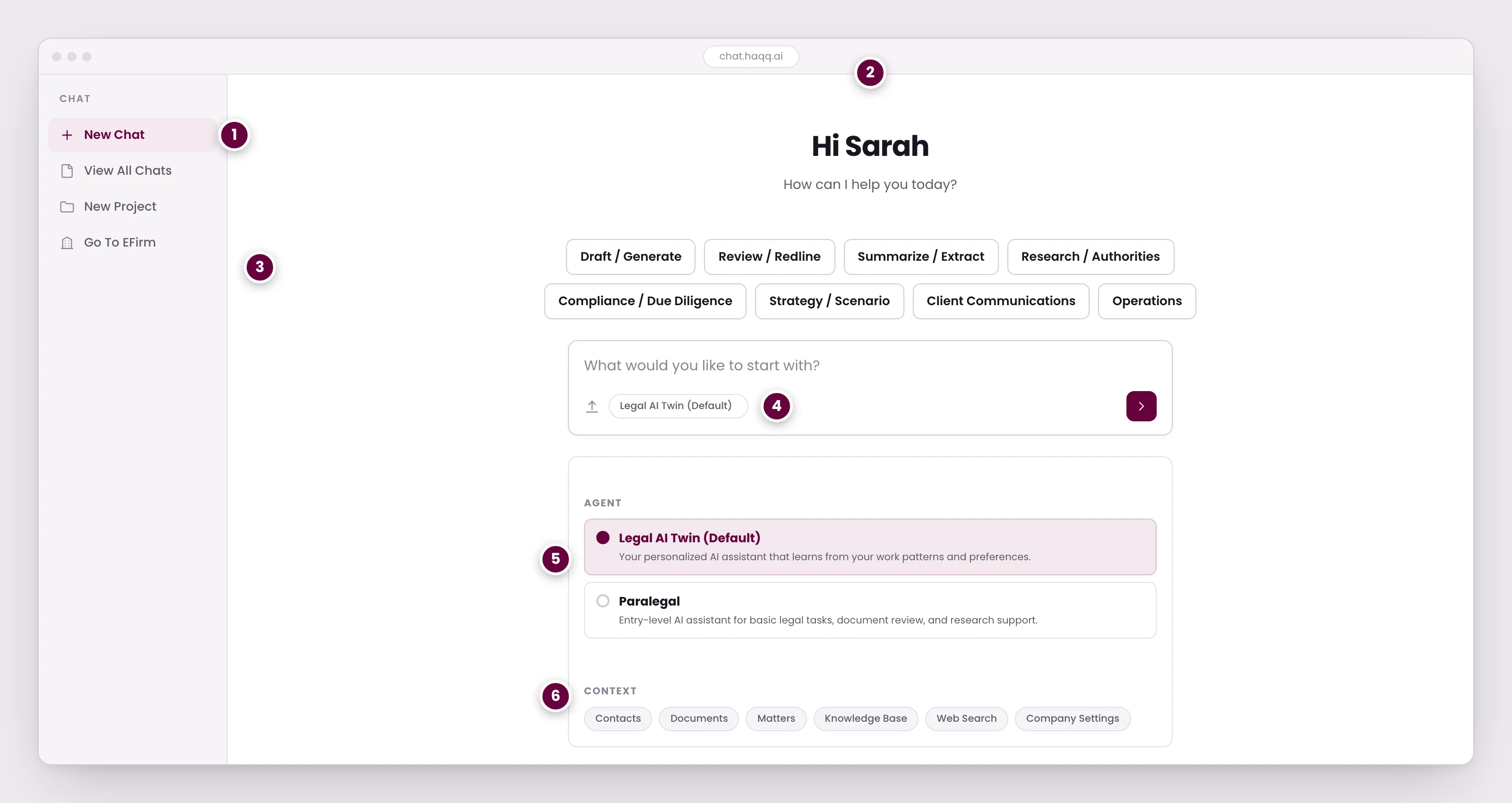
- Every session starts here. Projects group related chats, so a long engagement keeps one thread of context instead of scattering across conversations.
- The AI knows who is asking. The Legal AI Twin learns from your work patterns, so two lawyers at the same firm get answers shaped differently.
- Eight categories covering the work lawyers actually bring: drafting, review, summarizing, research, due diligence, strategy, client communications, and firm operations.
- The agent handling this session, set in the composer so it can be changed per conversation rather than only in settings.
- Two agents. The Legal AI Twin draws on your firm's data and prior work; Paralegal is the lighter one for routine review and research support.
- What the AI is allowed to draw on for this session: your contacts, documents, and matters, alongside web search and the firm's knowledge base.
Watch the Legal AI walkthrough
Englishالعربية ↗What the Legal AI Twin is
The Legal AI Twin is the personalised intelligence layer that sits inside every matter, every workspace and every workflow in HAQQ. It understands legal context (jurisdiction, practice area, matter history and document relationships) and produces outputs that are structured, verifiable and ready for professional use.
Unlike generic AI tools, it is trained to reason about law rather than only to generate text. It produces structured legal analysis, flags risks with citations, and holds context across an entire engagement.
Getting good answers
Brief it the way you would brief a senior colleague, not the way you would type into a search box. Name the jurisdiction, the parties and the posture, and say what you want back (a clause, a memo, a risk list, a reply to the other side). A thin prompt gets a thin answer.
| Prompt | |
|---|---|
| Thin | Draft an NDA. |
| Briefed | Draft a mutual NDA under UAE law between a Dubai-based fintech and a UK software vendor for a 6-month evaluation. Three-year confidentiality tail, carve-out for regulator disclosure, DIFC courts. |
The habits that follow from this (naming the jurisdiction, one matter per thread, attaching only what the question turns on) are collected in Best practices.
It answers legal questions and nothing else. Ask it something outside law and it will decline. That is the design, not a fault, and it is the reason its legal answers hold up.
Drafting and document analysis are where it earns its keep. Attach a contract and ask for the risks, the weak clauses, what to change, or a comparison against the counterparty's version. Research works too, but it is a slice of what the engine does rather than the main event.
Read the output before it leaves your desk. It gets you to a working draft in minutes instead of hours. The professional judgement on the way out the door is still yours.
Making it write like you
Every lawyer has access to the same statutes. What separates one from another is the wording they use, the terms of art they favour, and the templates they have built up over a career. That is what the Twin is for. It does not happen passively. You tell it.
- Ask for the document. You get HAQQ's own trained version, a complete, jurisdiction-aware draft.
- Give it yours. Paste in or attach the model you actually use, and say plainly: from now on, use this template for NDAs.
- Ask again. The next NDA comes back on your structure, with your clause order and your wording, not the default.
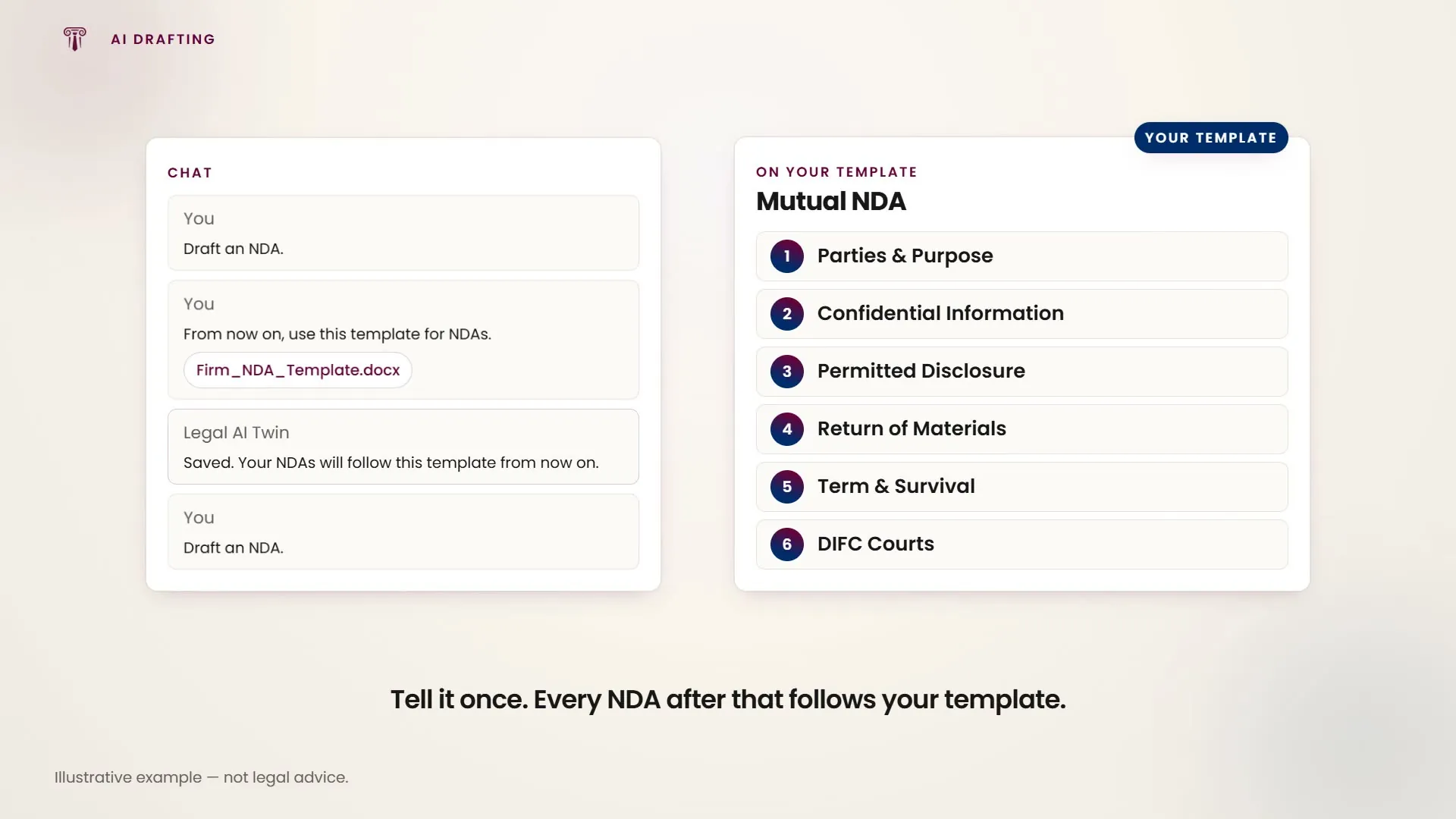
It holds this going forward rather than only for the current conversation, and it compounds: the more you correct its phrasing and feed it your own precedents, the closer the first draft lands to what you would have written. Because the Twin learns from your own work, two lawyers at the same firm get answers shaped differently.
Projects: giving the AI standing context
A project is a workspace you scope to one matter or one client. It holds two things: your own instructions, and a set of files the AI reads before it answers anything asked inside it. Projects also group related chats, so a long engagement keeps one thread of context instead of scattering across conversations.
- Instructions. The standing context you would otherwise retype every time: governing law, the parties, the house style a document has to follow, the position you are arguing from. Set once, applied to everything asked in that project.
- Project files are the contract, the pleadings, the correspondence, the precedent you work from. The AI grounds its answers in them rather than in general knowledge, so you stop re-attaching the same document to every question.
How the Twin works
- Jurisdiction-aware reasoning. Every response is tailored to the jurisdiction you are working in. Whether you are advising on UAE commercial law, English contract disputes or French labour regulations, the AI adapts its reasoning, references and output structure to match.
- Context-aware from your practice data. The AI pulls context directly from your matters, documents, client records and historical work. It starts from where your firm's knowledge already lives, not from scratch.
- Integrated into the workflow. The AI is not a separate tool you switch to. It lives inside the matter workspace, so when you ask it to draft, review or research, it already knows the matter context, the client and the work that has been done.
- Professional-grade output. Every output is structured for legal use: headings, numbered clauses, risk levels, citations and export-ready formatting. It gives you work product, not paragraphs.
Core capabilities
- Legal research. Ask legal questions and receive structured analysis: key points, issues, risks, applicable statutes and case law references. Citations are verifiable and outputs are jurisdiction-specific, not generic summaries.
- Document drafting generates contracts, pleadings, memos, notices and clauses. The AI understands legal language, clause hierarchy and jurisdictional requirements, producing drafts that are structurally sound and professionally formatted.
- Document review and risk analysis. Upload contracts or legal documents and get clause-level review: missing terms, inconsistencies, unfavourable provisions and compliance risks, flagged with severity ratings and suggested redlines.
- Prompt Library is a curated library of legal AI prompts built for drafting, research, review, summarisation and more. Public, and continuously expanding.
- Matter-level assistance. Inside every matter, the AI can generate status summaries, recommend next steps, prepare document packages for filing and draft client communications, with the matter context already loaded.
- Operational and financial support. Because HAQQ connects legal work to practice operations, the AI also assists with time-entry descriptions, billing narratives and internal reporting summaries, without switching tools.
The eight prompt categories
The AI chat organises prompts into eight clickable categories, so you can find the right starting point quickly. They are the same eight the Prompt Library is filtered by, so a prompt you find there maps onto where you would use it.
- Draft / Generate covers contracts, memos, clauses and legal documents
- Review / Redline. Clause-by-clause review with risk flags and suggestions
- Summarize / Extract produces structured summaries and key term extraction
- Research / Authorities. Case law, statutes and jurisdictional analysis
- Compliance / Due Diligence. Regulatory checks and compliance reviews
- Strategy / Scenario covers litigation planning and scenario analysis
- Client Communications. Client letters, updates and advisory emails
- Operations: time entries, billing narratives and internal reports
Choosing the agent and what it can read
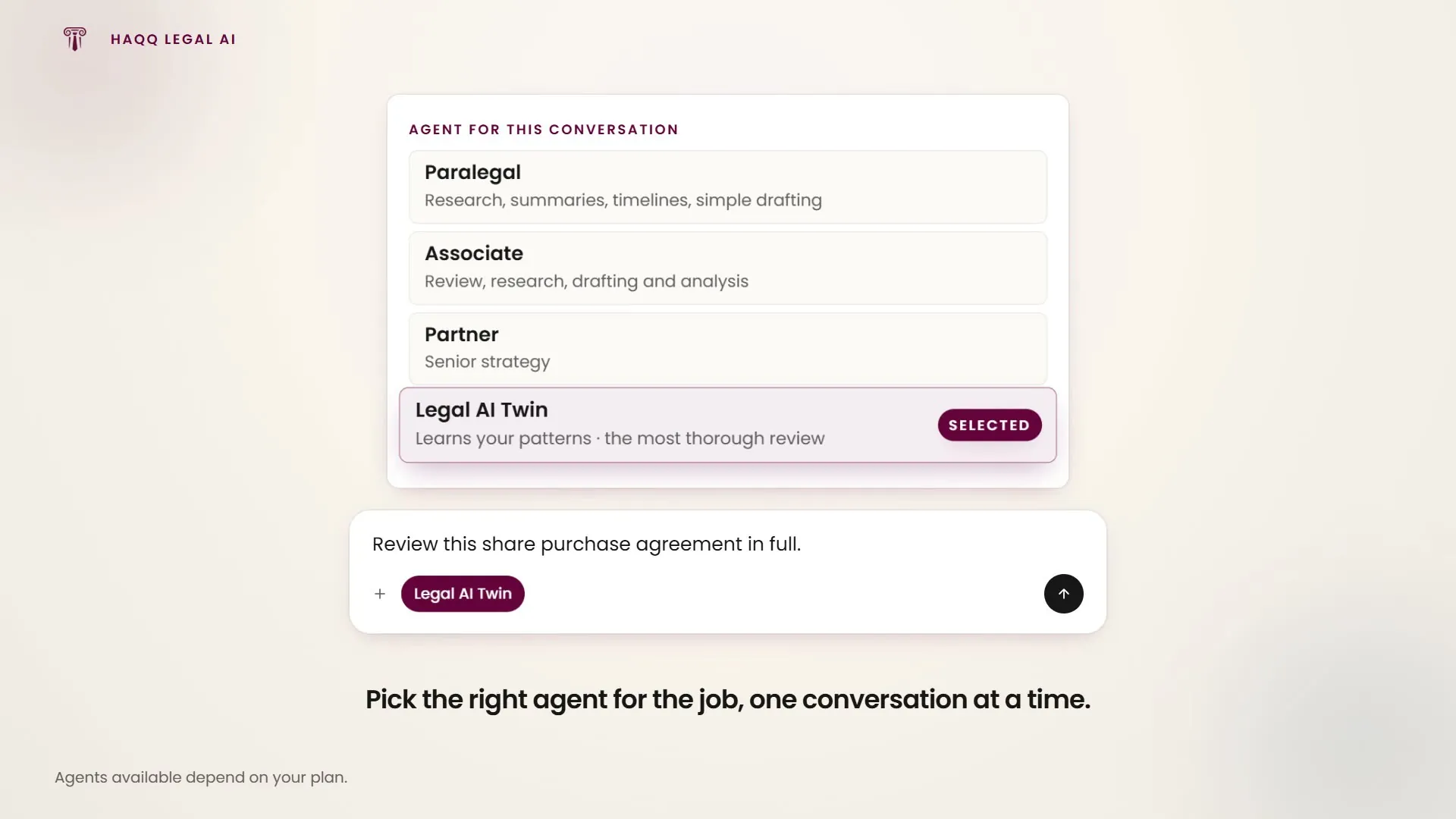
Two agents answer in HAQQ. The Legal AI Twin draws on your firm's data and prior work; the Paralegal agent is the lighter one, for routine review and research support. The picker sits in the composer rather than only in settings, so the agent can be changed per conversation. Which agents your plan includes is set out in Subscription plans, and the default is a per-person setting in AI Settings.
The chat input bar controls what the AI knows when it responds:
- Attachment button uploads documents for AI analysis.
- Legal AI Twin toggle switches between AI modes.
- Contexts. What the AI may draw on for this session: your contacts, documents and matters, alongside web search and the firm's knowledge base.
- Token counter: how much capacity is left today.
Matter-level AI integration
From any matter in eFirm there is an “AI assistant” bar that launches the Legal AI Twin with full matter context (the client, practice area, jurisdiction and every related document). The AI is embedded in where work happens, not separate from it. See Legal Matters.
Connected to your entire practice
The Legal AI Twin integrates with HAQQ eFirm, the practice management layer that handles matters, clients, tasks, billing, documents and firm operations. It is not an isolated tool.
That means the AI has access to the full picture: who the client is, what work has been done, what documents exist, what deadlines are coming and what the financial position looks like. It reasons across your practice, not just a single conversation.
Security, control and accountability
Every AI interaction is logged, traceable and governed by your firm's policies. The Legal AI Twin operates under lawyer-led accountability: the AI assists, the lawyer decides.
- Full audit trail for every AI-generated output
- Firm-level controls over AI behaviour and access
- Data isolation between workspaces and matters
- No training on your firm's data, your data stays yours
The platform-level detail (encryption, compliance position, data residency) lives on the HAQQ security page.
Customising how the AI works for you
HAQQ gives you control over default agent selection, reasoning mode, document export format, theme and text readability. Every lawyer can configure the AI to match their own workflow. See AI Settings.
Where to go next
AI Legal Research · AI Drafting · AI Document Review · Prompt Library · eFirm practice management